

If you spent a small fortune on the Dell XPS 17 9730 in 2023, you likely expected a sleek and unstoppable powerhouse of a laptop. Instead, now in 2026, many users are increasingly finding themselves tethered to a computer that feels like it’s constantly fighting against its own hardware for the past 2+ years.
Between thermal throttling that turns your high-end Core i9 processor into a glorified calculator and audio drivers that sound like a bowl of Rice Krispies (or speakers just going mute altogether), the “buggy” reputation is, unfortunately, well-known. Here is a deep dive into why this happens, which laptops are actually worth your money today, and how to get the most cash back for your current Dell.
Why the Dell XPS 17 9730 is So Buggy
The XPS 9730 was meant to be the pinnacle of the 17-inch “thin and light” workstation, but pushing that much power into such a slim chassis created a perfect storm of technical headaches:
1. The Thermal Management Paradox
Dell utilized a vapor chamber cooling system that, on paper, is revolutionary. However, in practice, the RTX 40-series GPU and 13th Gen Intel chips generate more heat than the thin frame can dissipate.
- The Result: “Thermal Throttling.” When the system hits 100 degrees C (which often occurs during rendering or gaming), the BIOS aggressively cuts power to the CPU/GPU to prevent a meltdown, causing massive lag or a downright critical temperature shutdown.
2. “Hybrid Power” Battery Drain
A common complaint is the battery percentage dropping even while the laptop is charging (via a supplied 130W AC adapter). This is due to Dell’s “Hybrid Power” feature. Under heavy load, the system pulls more than 130W, “borrowing” the extra juice from your battery. If you’re doing intensive work, you can actually run out of battery while plugged in!
3. The “Driver Hell” Cycle
Dell’s proprietary software, SupportAssist, often conflicts with Windows 11 updates. Users frequently report:
- Audio Popping/Mute: DPC latency issues are causing crackling in the speakers or headphone jack. Occasionally, you won’t hear any sound, neither from the speakers nor through the headphone port.
- Trackpad Ghosting: A hardware-software mismatch that makes the cursor jump or the click feel “mushy.”
- Sleep Mode Failures: The “Modern Standby” bug, where the laptop stays hot and drains its battery inside your bag.
Top 3 Alternatives to the XPS 17 in 2026
If you’re ready to move on, the 2026 laptop market has some incredible options that prioritize stability over “thin-at-all-costs” aesthetics.
| Laptop | Best For | Why It’s Better |
| MSI Prestige 16 AI Evo | Productivity & AI | Exceptional thermal efficiency and a 4K OLED screen that actually stays cool. |
| Framework Laptop 16 | Longevity | Fully modular. If a port breaks or the GPU gets outdated, you just swap the module, not the laptop. |
| Razer Blade 16 (2026) | Power Users | Superior cooling with a thicker chassis and the latest RTX 50-series graphics. |
Pro Tip: If you want to stay with Dell, the revived 2026 XPS 16 has fixed many of the 9730’s issues by moving to a more efficient Intel Panther Lake architecture, though it sacrifices some of the “workstation” ports you might miss.
Resale Options: Getting the Most for Your Buggy XPS 9730
This laptop model is too expensive to just let it depreciate in a drawer. Even with its bugs, the XPS 17 9730 still retains solid resale value today due to its premium build and a large 17-inch screen (which Dell has since phased out in favor of the 16-inch lineup). Here are some of the foolproof selling options:
1. Professional Buyback Sites
Sites like ours, CashYourLaptop, LaptopNuts, or Gizmogo are the easiest (and often the fastest) route. As of mid-2026, a 9730 in good condition can still fetch between $630 and $900, depending on the specs (i9-based configurations being the highest).
2. Specialized Marketplaces
- Swappa: Great for tech enthusiasts. You’ll likely get a higher price here than you would with a trade-in, as buyers are looking for these specific 17-inch “legacy” designs.
- eBay: High reach, but beware of scammers. Always film yourself boxing the laptop and getting it scanned at the post office.
RELATED: How to Sell a Laptop Back for the Best Price in 2026.
Steps to Complete Before You Sell Your XPS 17:
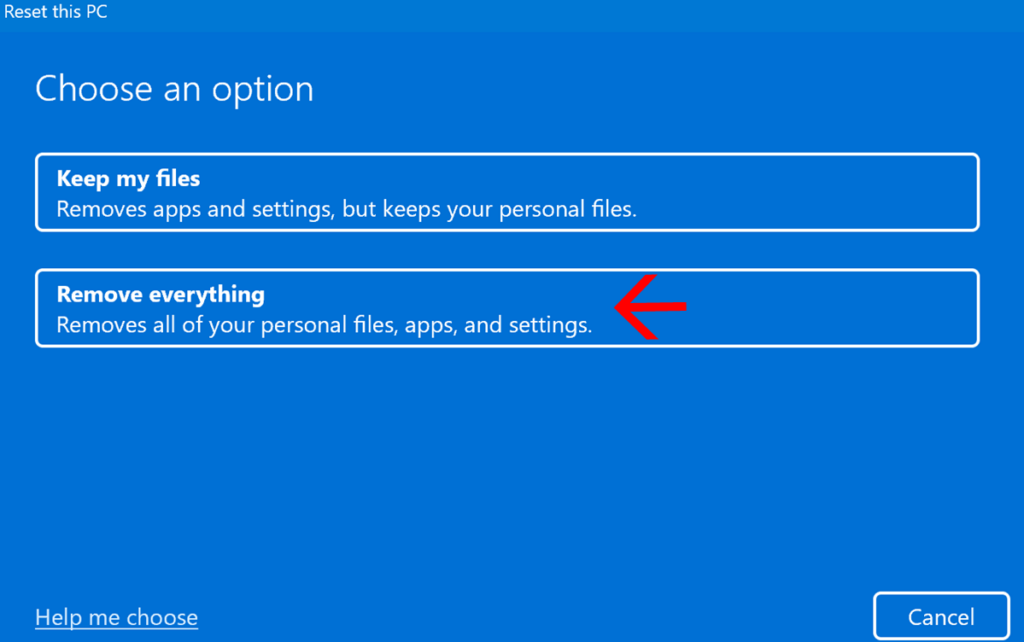
- Wipe Stored Data: Use the “Remove Everything” option in Windows Reset.
- Clean the Fans: A quick blast of compressed air can stop the “loud fan” complaints from potential buyers.
- Check the Battery Health: Generate a report by typing
powercfg /batteryreportin Command Prompt to show buyers the battery is still healthy.
In Conclusion: To Fix or to Flip?
The Dell XPS 17 9730 is no doubt a capable laptop, but if you’ve tired of constant driver failures and overheating, don’t feel guilty about moving on. In the uber-diverse tech landscape of 2026, you shouldn’t have to handle a professional-grade computer with kid gloves just to get through a workday. Whether you choose to swap it for a modular Framework or a competitor powerhouse like Razer, your productivity (and perhaps your sanity) will thank you. Selling your XPS 17 now, while it still holds significant salvage value, is the smartest way to fund an upgrade that actually works as hard as you do.